
Open PinoCasino on Mobile
PinoCasino works on Android, iPhone and iPad through our mobile website and installable web app. You can open the casino in your browser or add a PinoCasino icon to the home screen for direct access. The installation uses Chrome on Android and Safari on iOS, so a separate APK is not required.
The verified Pino Casino installation method does not require Google Play or an App Store download. It runs from the live mobile web platform.

Use the PinoCasino App on Mobile
Our mobile app is the PinoCasino website installed on your phone or tablet as a home-screen web app. Once added, the PinoCasino icon opens the mobile casino directly instead of making you navigate to it from a browser tab each time.
There is no separate account for mobile. Existing players sign in with the same registered email address and password used on desktop. If you prefer not to install anything, PinoCasino also works directly in a supported mobile browser.
The two access methods lead to the same casino platform. The difference is simply how you open it: from Chrome or Safari, or from a PinoCasino icon on the home screen.
Install PinoCasino on Android
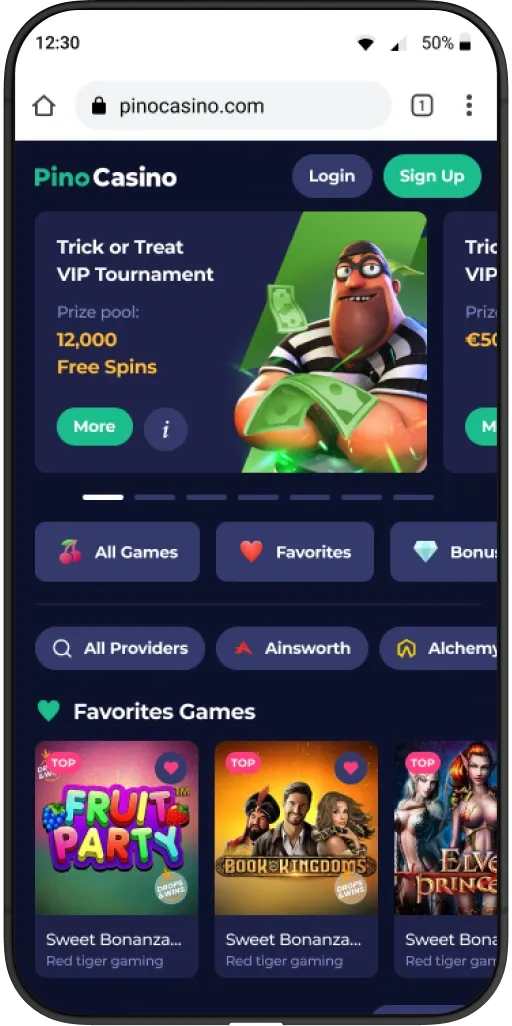
PinoCasino can be added to an Android home screen directly from Chrome. No APK file, Google Play download or installation from unknown sources is needed.
- Open PinoCasino in Chrome on your Android phone or tablet.
- Open the three-dot menu in the top-right corner of Chrome.
- Select Add to Home screen, then tap Install.
A PinoCasino icon is added to the home screen. Tap it whenever you want to open the web app.
Install PinoCasino on iPhone or iPad
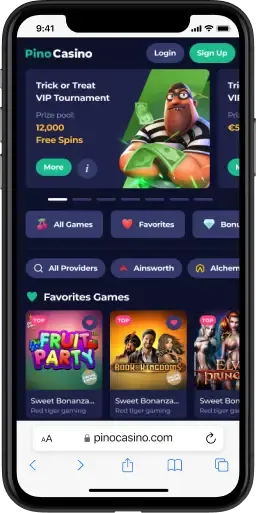
On iPhone and iPad, the home-screen version is added through Safari.
- Open PinoCasino in Safari.
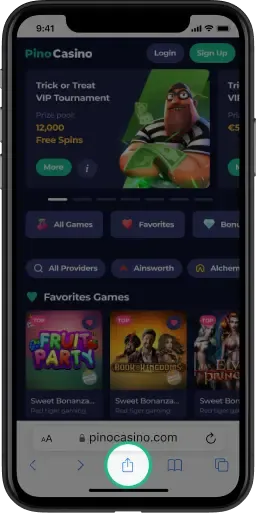
- Tap the Share button.
- Select Add to Home Screen and confirm.
The PinoCasino shortcut will then be available alongside the other icons on your home screen. Tap it to open the mobile web experience directly from the shortcut.
Is There a PinoCasino APK?
You do not need a PinoCasino APK to install the mobile web app on Android. The supported installation method runs through Chrome and uses Add to Home screen.
This also means there is no reason to enable installation from unknown sources or download an APK from a third-party website. The home-screen version loads PinoCasino from the web and keeps access tied to the live casino platform.
For iPhone and iPad, installation works through Safari's Add to Home Screen option. No App Store download is required for this method.
PinoCasino Mobile Login
The same PinoCasino account works in the mobile browser and in the home-screen web app. Existing players use the email address and password registered to their account.
If you have forgotten your password, cannot access a locked account or no longer remember the registration email, use our login guide for the relevant recovery route.
Open the PinoCasino login guide →Sign in, reset a password or restore access to an existing account.
New players create an account on the casino platform rather than through a local form on this page.
What You Can Do on PinoCasino Mobile
Mobile access is built around the same everyday account tasks you would expect from PinoCasino. You can browse mobile-compatible casino games, open slots and table games, enter the live casino area, sign in to your account and manage account settings from a phone or tablet.
Promotions can be accessed from mobile as well. Current offers are covered separately on our current bonuses page, so the app page stays focused on access and installation.
Deposit and withdrawal functions are also available from the mobile platform. For payment methods and transaction information, use the dedicated deposits and withdrawals page.
Support remains reachable from the mobile casino when account or payment help is needed.
Browser or Home-Screen App?
Both methods use the same PinoCasino account. Installing the shortcut mainly changes how you launch the casino.
| Option | Installation | How it opens | Account |
|---|---|---|---|
| Mobile browser | None | Chrome or Safari tab | Same PinoCasino account |
| Home-screen web app | Add to Home Screen | PinoCasino icon | Same PinoCasino account |
The browser is fine when you only want to open PinoCasino occasionally. The home-screen version gives you a direct icon without requiring a separate downloadable app package.
Update or Remove the Web App
The PinoCasino web app loads the current mobile website, so there is no separate APK update file to download. Changes to the mobile casino are delivered through the web platform rather than through a manual app-package update.
To remove the web app, delete the PinoCasino icon or shortcut from the home screen as you would another home-screen item. Removing that shortcut does not delete your PinoCasino account.
You can still return through the PinoCasino official website in a mobile browser and add the shortcut again later.
PinoCasino App FAQ
Does PinoCasino have an app for Android and iOS?
Yes. PinoCasino uses an installable web app that can be added to the home screen on Android, iPhone and iPad. It runs from the mobile web platform rather than a separate APK.
How do I install PinoCasino on Android?
Open PinoCasino in Chrome, use the three-dot menu, select Add to Home screen, then tap Install.
How do I add PinoCasino to my iPhone home screen?
Open PinoCasino in Safari, tap Share, select Add to Home Screen and confirm.
Do I need a PinoCasino APK?
No. The Android web app installs from Chrome, so an APK is not required for the supported installation method.
Can I use PinoCasino without installing anything?
Yes. You can continue using PinoCasino in a mobile browser without adding a home-screen shortcut.
Can I use my existing account in the web app?
Yes. Sign in with the same registered email address and password you already use for PinoCasino.
Can I play PinoCasino games on mobile?
Yes. Mobile-compatible casino games can be opened through the PinoCasino mobile platform, including slots, table games and live casino titles available for mobile play.
Can I make deposits and withdrawals on mobile?
Yes. Account payment functions are accessible from the mobile platform. Available methods and payment details are covered on our payment page.
How do I remove the PinoCasino web app?
Delete the PinoCasino home-screen icon or shortcut. Your casino account remains intact and can still be accessed from the browser.
Open PinoCasino on Your Phone
Use PinoCasino directly in your mobile browser or add the web app to the home screen for a one-tap launch. Android installation runs through Chrome; iPhone and iPad installation runs through Safari.
